When we look at the demanding terrain of Indonesia, we quickly realize that traditional geological surveys can be incredibly slow and labor-intensive. Dense jungles, remote islands, and uneven ground make laying out heavy cables a nightmare. But today, we are experiencing a massive shift in how we explore the earth. Welcome to the era of Walking TEM Technology.
By utilizing the ABEM GroundTEM Trek, our teams can now walk through a site and gather high-quality data without stopping. This system is a lightweight, backpack-mounted transmitter and receiver designed for efficient surveying in the most remote locations. In this article, we will show you exactly how this technology accelerates our subsurface mapping processes, making it a game-changer for hydrogeology, geotechnical surveys, and mining.
Here are the top ways the ABEM GroundTEM Trek is revolutionizing our workflow.
Unleashing Zero Setup Time Geophysics
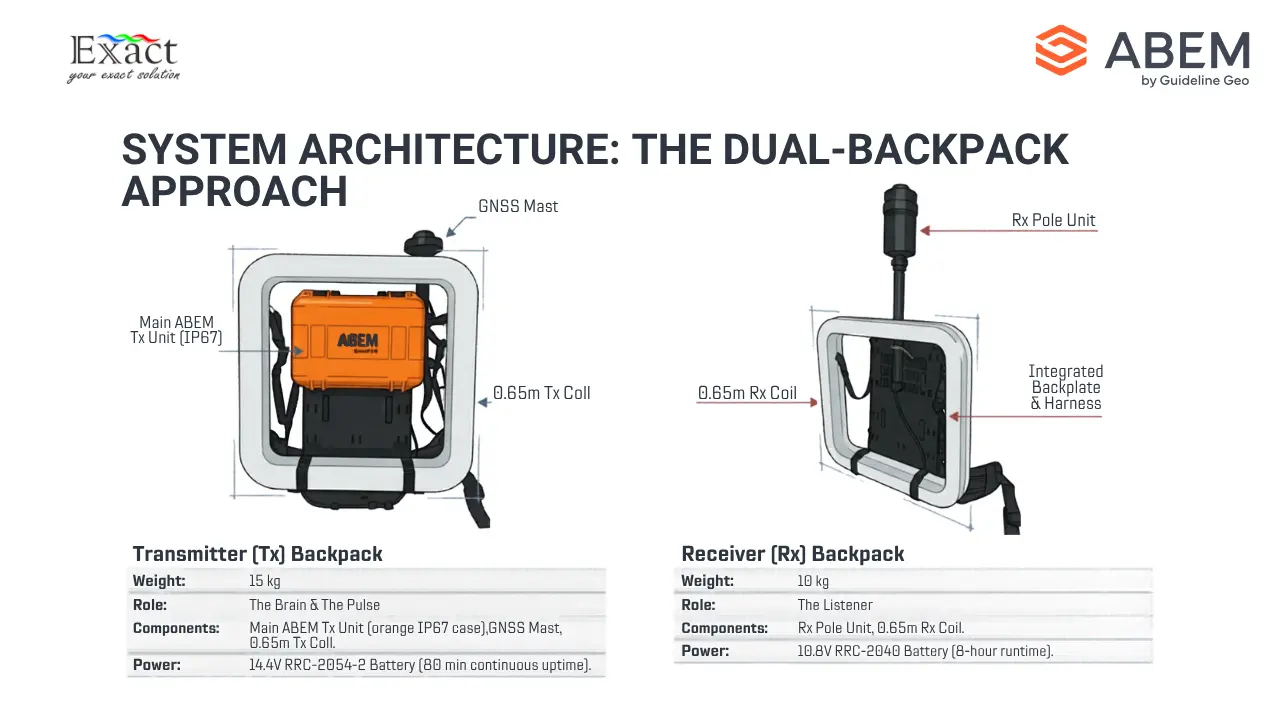
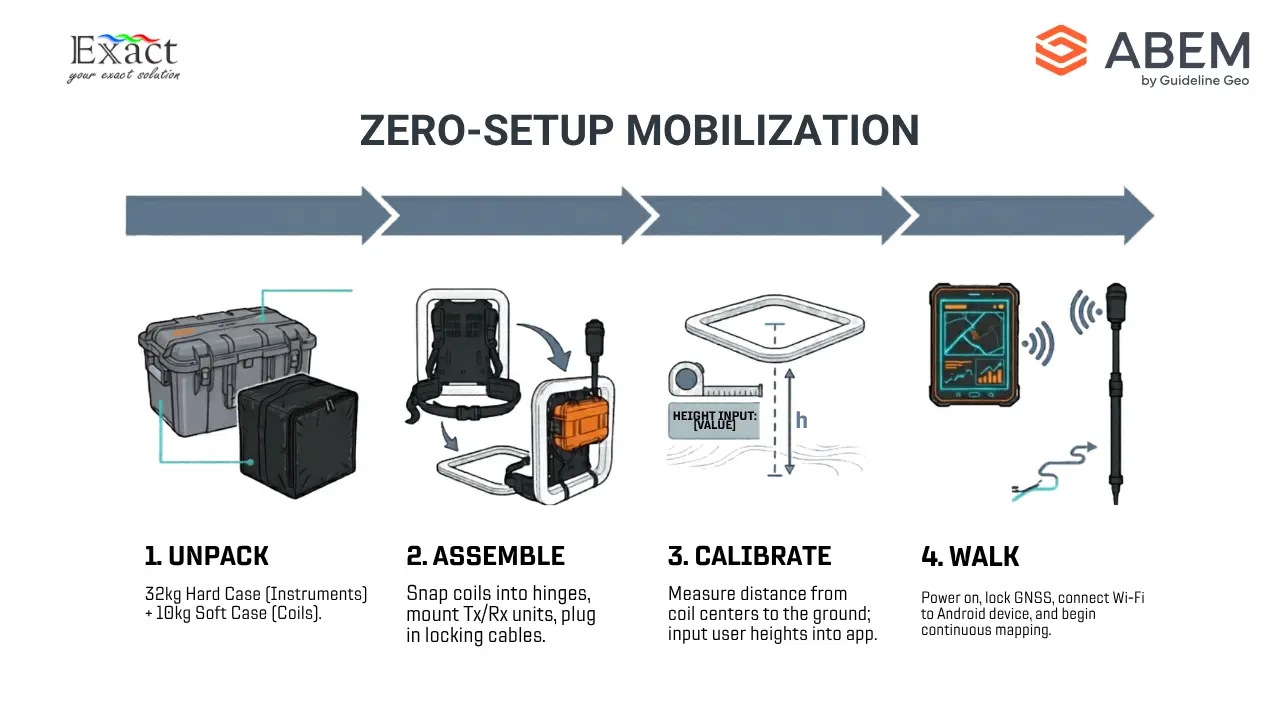
In the past, setting up a Transient Electromagnetic (TEM) survey meant spending hours laying out massive wire loops on the ground. Today, we achieve Zero Setup Time Geophysics. The ABEM GroundTEM Trek completely eliminates the need for ground cables. Instead, the entire system is worn on our backs.
The system comes neatly packed in two cases: a hard case weighing 32 kg for the instruments and batteries, and a soft case weighing 10 kg for the coils. When we arrive at a site, our assembly process is fast and straightforward.
First, we assemble the receiver (Rx) backpack. We take the 0.65 m x 0.65 m receiver coil, insert the receiver pole into the backpack bracket, and secure it with clips. We align the hinges of the coil to the backpack, secure the straps, and mount the Rx unit onto the pole. Finally, we plug the cable in and lock it. The entire receiver setup weighs only 10 kg.
Next, we set up the transmitter (Tx) backpack. We take the Tx mast and secure it to the backpack. We mount the main orange Tx unit—which houses the primary computer and real-time processing hardware—onto the backpack plate. We attach the 0.65 m x 0.65 m transmitter coil, secure it to the GPS mast, and connect the cables. The transmitter setup weighs 15 kg.
Within minutes, we are fully geared up. There are no wires dragging on the ground, allowing us to start our survey immediately.
The Science of Fast-track Mineral Exploration 2026
To understand how we achieve Fast-track Mineral Exploration 2026, we need to look at how the Transient Electromagnetic method actually works.
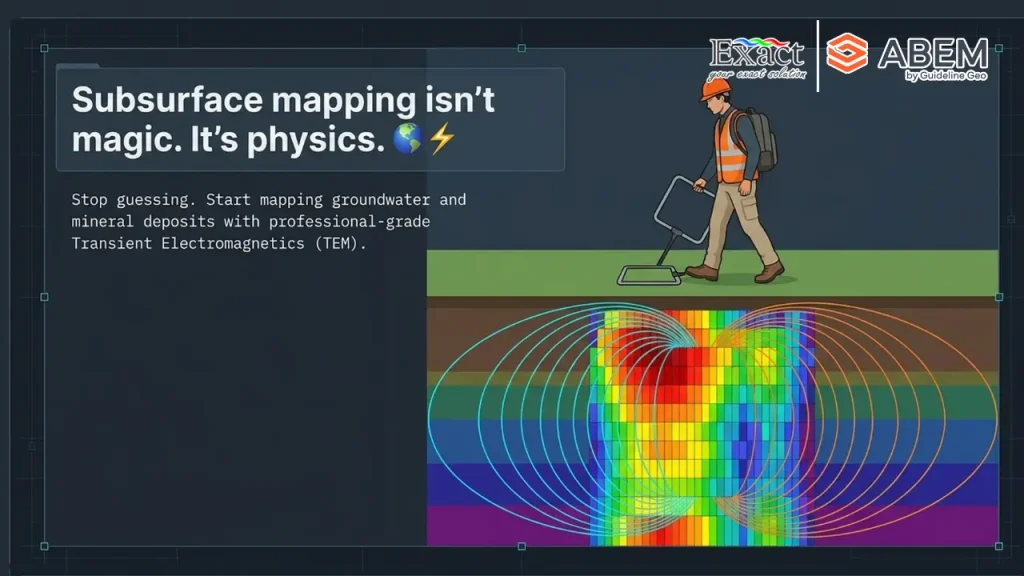
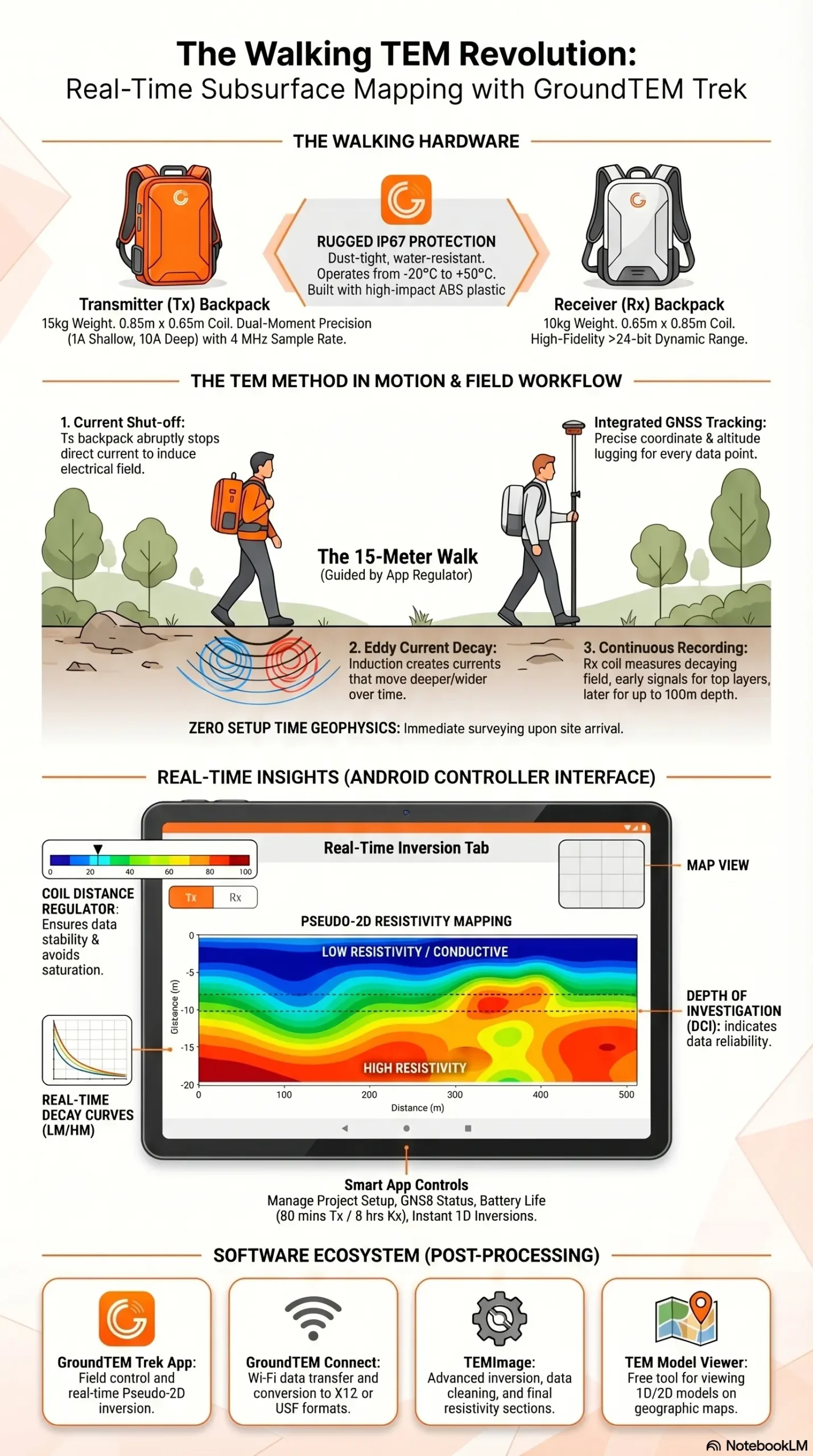
Our transmitter backpack sends a direct current through the transmitter coil, creating a static primary magnetic field. We then shut this current off very abruptly. This sudden shut-off induces an electrical field in the surrounding ground.
This electrical field creates electrical currents in the earth, known as “eddy currents.” These eddy currents generate their own secondary magnetic field. As time passes, the resistance in the ground weakens these currents, and they move deeper and wider into the earth.
The receiver coil on our second backpack measures this decaying secondary magnetic field as a function of time. Right after the current is turned off, the signal tells us about the top layers of the soil. A few microseconds later, as the current travels deeper, the signal tells us about the deeper geological layers. By constantly repeating this process while we walk, we build a continuous, fast-tracked map of the earth’s conductivity at different depths.
Mapping Nickel Laterite on the Move
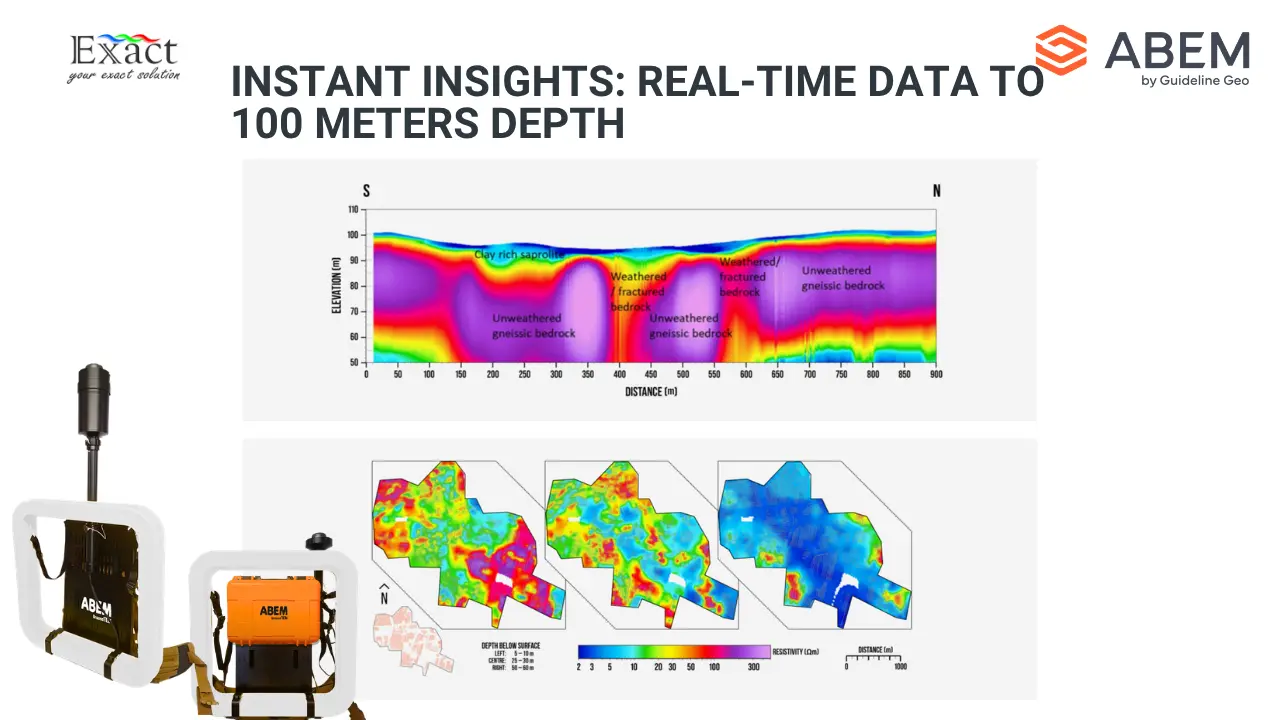
Indonesia is famous for its rich nickel laterite deposits. Because these deposits are typically found relatively close to the surface, the ABEM GroundTEM Trek is the absolute perfect tool for the job. The system gives us a highly accurate depth range of 50 to 100 meters. This shallow-to-medium depth capability is exactly what we need for Mapping nickel laterite on the move.
To map these resources, our field crew operates in pairs. One person wears the transmitter backpack, and the other wears the receiver backpack. It is highly important that the person wearing the receiver backpack does not wear any metallic items like belts, phones, or excessive jewelry, as these can create noise and ruin the data.
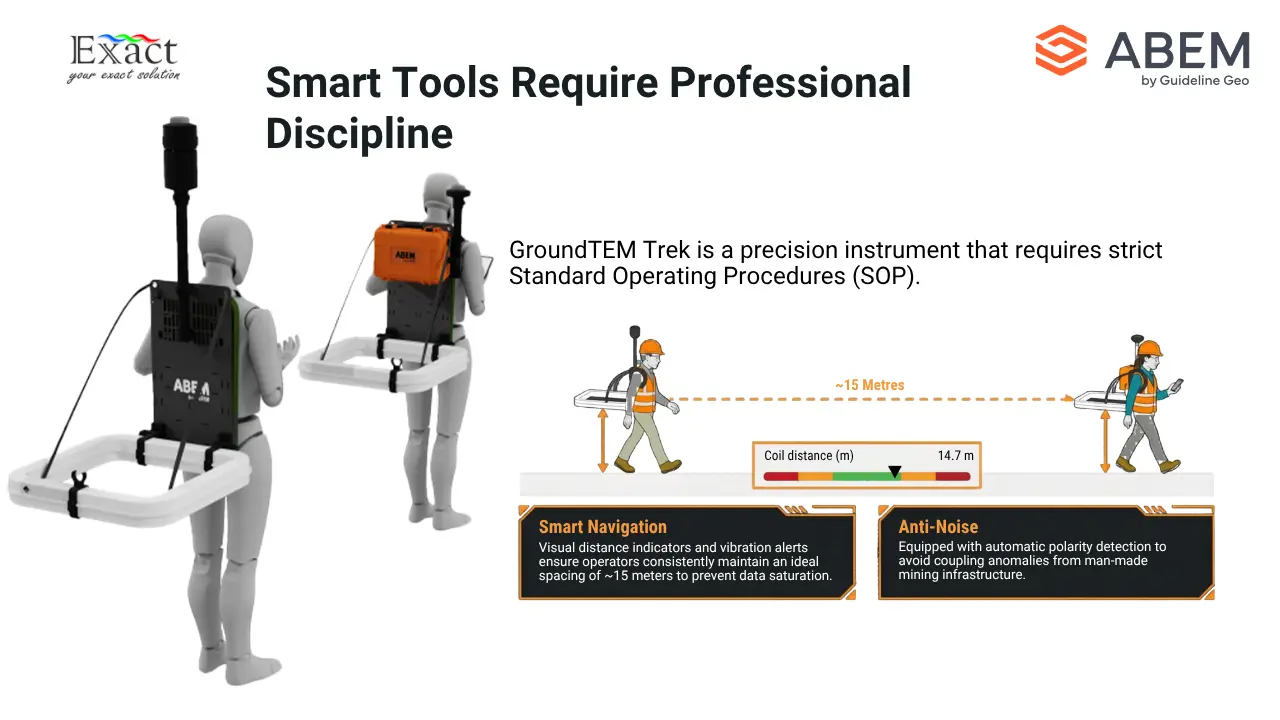
Before we start walking, we measure the distance from the center of the coils to the ground for both operators. We enter these specific heights into our mobile app. Then, we simply walk in a straight line. We must maintain a distance of about 15 meters between the two operators. As long as we keep the coils parallel to the ground, the system records continuous, high-quality data while we walk over the laterite deposits.
Delivering Real-time Subsurface Profiling
Perhaps the most exciting feature of this system is Real-time Subsurface Profiling. In the old days, we had to finish a survey, travel back to the office, download the data, and spend days running complex software inversions just to see what was underground. Now, we see it instantly in the field.
The operator wearing the transmitter backpack controls the entire survey using the GroundTEM Trek App on an Android mobile device. We connect the phone to the transmitter’s built-in Wi-Fi.
If our instrument has the Premium features enabled, we gain access to the real-time inversion tab. As we walk and collect data, the onboard computer automatically runs a preliminary 1D inversion using a smooth model. By combining these 1D models along our walking path, the app displays a beautiful pseudo-2D color section on our screen. We can actively look at the depth of investigation (DOI) and see the geological structures forming on our screen in real-time. If we hit an interesting conductive zone, we know about it immediately.
Smart App Control and Navigation
The GroundTEM Trek App makes our workflow incredibly smooth. When we start a new project, we input our project name, select our background map, choose our equipment protocol (such as the 1A/10A dual-moment setting), and enter our coil heights.
The app features a “Coil Distance Regulator” right on the main screen. Because it is crucial that the two operators stay the correct distance apart (usually around 15 meters), this visual bar helps us stay aligned. If we walk too close together or drift too far apart, the distance indicator turns red, the mobile device vibrates, and the receiver backpack beeps to warn the second operator. We simply pause, adjust our distance until the indicator turns green again, and keep walking.
The app also shows us live data curves (LM and HM decay curves), apparent resistivity graphs, battery life, and the internal temperature of the equipment. It puts total control of the survey right in the palm of our hands.
Rugged Hardware for Demanding Environments
We know that exploring the Indonesian wilderness is tough on equipment. The ABEM GroundTEM Trek is built to survive. Both the transmitter and receiver units are made of high-impact ABS plastic and feature an IP67 rating, meaning they are highly resistant to dust and water. While they are not meant to be submerged underwater, they handle rainy conditions perfectly well.
Power management is also simple. The system uses smart Li-ion RRC-type batteries. The transmitter uses one 14.4 V battery that gives us about 80 minutes of continuous runtime. The receiver uses a 10.8 V battery that lasts an impressive 8 hours. We carry extra batteries in our customized charging suitcase, allowing us to swap power sources in the field and survey all day long. If the equipment gets too hot (above 75 °C), it features passive cooling and will automatically shut down to protect the internal electronics.
Integrated GNSS and High-Fidelity Data Logging
Accurate location data is critical. We cannot map a mineral deposit if we do not know exactly where we are standing. The ABEM GroundTEM Trek features a built-in GNSS receiver with SBAS mounted on a pole above the operator’s head. This constantly tracks our exact coordinates and altitude.
The data logging itself is top-tier. The dual-moment transmitter fires at 1 Amp for shallow data and 10 Amps for deeper data. The receiver captures this information at a massive 4 MHz sample rate with a dynamic range of greater than 24 bits. The system logs up to 1024 raw gates of data to a 128 GB internal solid-state drive. This ensures that every tiny variation in the earth’s conductivity is recorded with perfect clarity.
Handling Noise and Interference
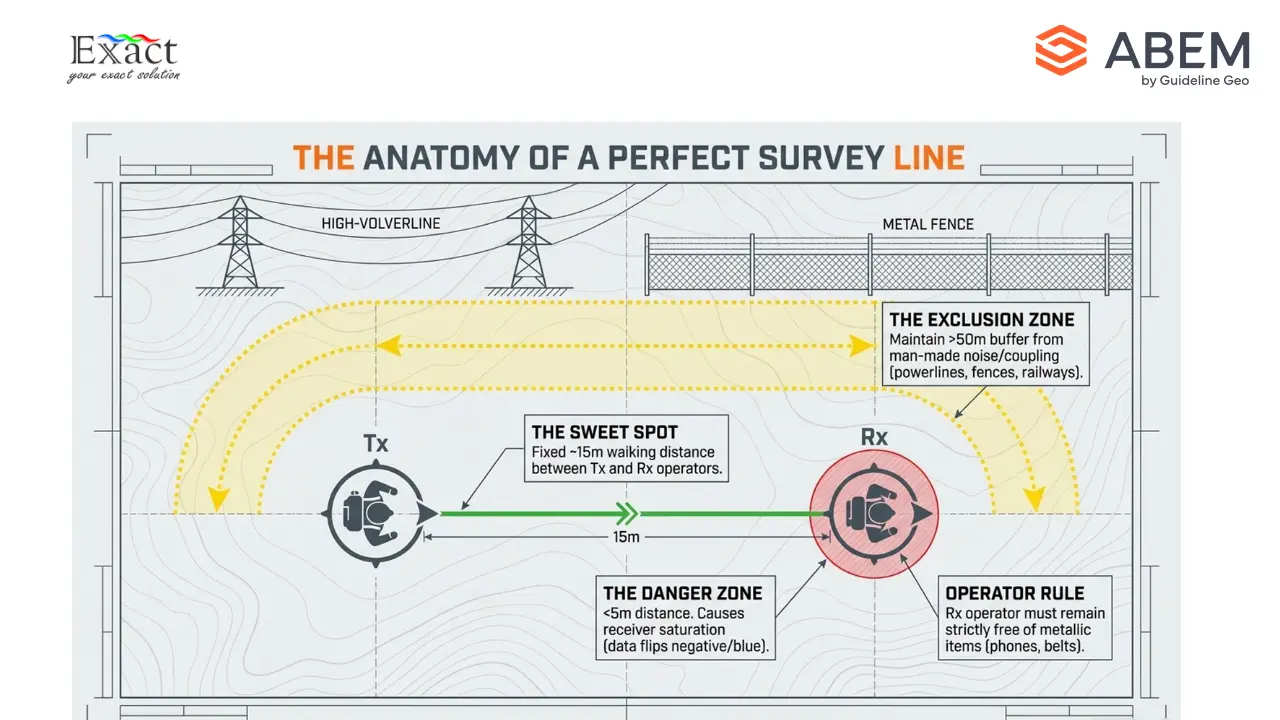
Sometimes, our surveys take us near villages or active mining infrastructure. Man-made conductors can create heavy interference, known as “coupling,” which ruins TEM data. Common sources of noise include power lines, buried cables, metal fences, railway tracks, and wind turbines.
To get clean data, our rule is to maintain a minimum distance of 50 meters between our transmitter coil and any metal or electrical infrastructure.
The GroundTEM Trek also has automatic polarity detection. If we accidentally walk too close to each other (under 5 meters) or hold the coils at severe angles, the measurement gate can become saturated, and the data might flip to negative (shown as blue curves on the app). If the app throws an “Alternating sign pattern not detected” error, we know there is too much noise, or we need to correct our spacing and try again.
Seamless Data Export and Analysis
When the walking is done, handling the data is effortless. We do not need to pull out SD cards or use complicated cables. We simply turn on the GroundTEM Trek unit, connect our local PC to the instrument’s Wi-Fi network, and open the GroundTEM Connect software.
From this software, we can easily select our project folders and copy the unified .stb files straight to our computers. The GroundTEM Connect software even has a built-in “Convert Data” tool. We can instantly convert our raw field data into XYZ formats, USF files, or formats ready for advanced software like TEMImage, AGS Workbench, or SPIA.
For final processing, we frequently use TEMImage. This software allows us to clean up any noisy data points and perform advanced inversions to create highly detailed, final resistivity sections. We can also use the free TEM Model Viewer to explore our 1D and 2D models overlaid on top of geographic maps.
The mining and exploration landscape in Indonesia is evolving. With Walking TEM Technology, we are no longer held back by heavy cables, slow setup times, and delayed data processing. By strapping on the 10 kg and 15 kg backpacks, maintaining our 15-meter spacing, and monitoring real-time inversion models on our Android screens, we are mapping the subsurface faster and smarter than ever before. From shallow aquifers to deep nickel laterite deposits, the ABEM GroundTEM Trek accelerates our workflow by 10x, providing rapid, reliable insights exactly when and where we need them.
Frequently Answer Questions
Q: How deep can the ABEM GroundTEM Trek scan?
The system provides a reliable depth range of 50 to 100 meters, which is ideal for hydrogeology, geotechnical surveys, and mapping shallow mineral deposits like nickel laterite.
Q: Can we use the equipment in the rain?
Yes. Both the transmitter and receiver units, as well as the coils, are built with ABS plastic and carry an IP67 rating. This means they are highly resistant to dust and can handle rainy field conditions, though they should not be submerged in water.
Q: How long do the batteries last in the field?
The transmitter battery (RRC-2054-2, 14.4 V) lasts for approximately 80 minutes of continuous surveying. The receiver battery (RRC-2040, 10.8 V) uses less power and lasts up to 8 hours. We recommend carrying spare batteries to keep surveying all day.
Q: How far apart do the two operators need to walk?
The operators should maintain a distance of approximately 15 meters. You must remain at least 5 to 6 meters apart to prevent the receiver from becoming saturated and recording incorrect polarity data. The GroundTEM Trek App features a Coil Distance Regulator that uses color-coded bars to help you easily maintain the perfect spacing.
Q: Why is my data curve turning blue (negative) on the app?
The app plots negative data in blue. If the data stream starts positive (red) and then switches to negative, it usually means the coils were positioned too close to each other (under 5 meters) or were not held horizontally. If the data flips to negative above the noise level, you may be walking over a strong man-made noise source or experiencing an Induced Polarization (IP) effect in the ground.
Q: Do I need an internet connection to use the Android App?
No internet connection is needed to control the survey. The mobile device connects directly to the transmitter’s built-in Wi-Fi network. However, if you want to use the default OpenStreetMap as your background, you will need a brief internet connection (like a mobile hotspot) to load the map before starting your survey. You can also pre-load your own custom offline maps.
Explore the Subsurface with Us:
Are you ready to accelerate your mineral exploration projects with Zero Setup Time Geophysics? Partner with PT. Exact Global Teknologi to bring this revolutionary technology to your operations.
- Website: www.exactglobal.co.id
- Email Marketing: marketing@exactglobal.co.id
- WhatsApp: +62 812-9252-3900