Contact Us Contact us
Aarhus Workbench & Aarhus SPIA
AGS Inversion Software

Aarhus Workbench & Aarhus SPIA

Available to buy or rent. Training and local support included.

Product details

Aarhus Workbench & Aarhus SPIA

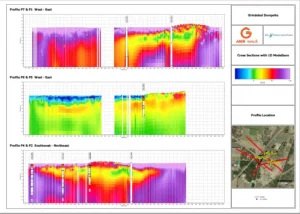
The software developed by  Aarhus GeoSoftware  is based on extensive user experiences with various electrical and electromagnetic geophysical methods.  AARHUS SPIA  is aimed at geophysical soundings measured as either  Vertical Electrical Soundings (VES)  or  Transient Electromagnetic (TEM)  soundings whereas processing and inversion of profile-oriented data as ERT/IP, GCM or even airborne TEM and HEM data is performed in  AARHUS WORKBENCH .

Image Information

Aarhus Workbench

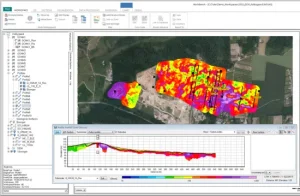
Aarhus Workbench is a unique and comprehensive software package for processing, inversion, and visualization of geophysical data. The package integrates all steps in the workflow from processing the raw data to the final visualization and interpretation of the inversion models. The Aarhus Workbench package includes dedicated data processing modules for different geophysical data types, an integrated GIS platform, which supports all EPSG coordinate systems and a 3D viewer for visualization of the geophysical results.


Information Image

Aarhus SPIA

Aarhus SPIA  is a processing and inversion software for ground-based TEM and DC data. The graphical user interface simplifies the processing and inversion process and enables user-friendly and intuitive access to each step in the process. The processed data and inversion models are all saved in the same SPIA database and can be imported directly into the Aarhus Workbench Essentials module for easy visualization of the results. In Aarhus SPIA TEM, data obtained with ABEM WalkTEM is imported directly. The electromagnetic data can be plotted in different ways, eg raw or stacked in either dB/dt or apparent resistivity mode. Noise and spike filtering are done automatically when importing data.  The Aarhus SPIA DC module  imports  ABEM SAS instrument file formats  directly but data can also be imported either by importing other data files or by manually typing data into the software. On import, UTM coordinates can be added to each sounding.